

“It works on my machine, but it fails when it runs through the CI/CD pipeline,” is a sentence every infrastructure engineer has heard. If you’re a part of a distributed team managing infrastructure in the enterprise, chances are you’ve even heard this multiple times per day. If you’re working with macOS infrastructure in particular, the issue could be anything from a mismatched version of Xcode to a missing dependency on the CI runner. Whatever the cause, even if you manage to fix it manually, it comes back a few weeks later from a different team using a different set of CI runners. If this sounds familiar, you’re not alone. At the end of the day, the root cause isn’t individual mistakes or misconfigurations, it’s a lack of Infrastructure-as-Code based best practices designed for macOS build environments.
While Linux and Windows-based CI/CD pipelines are typically heavily automated, macOS build agents often remain unique, individually crafted environments that are each just slightly different from one another. In addition to being inconsistent and causing configuration drift, this uniqueness erodes confidence in your CI/CD pipeline over time. For enterprise teams building iOS and macOS applications at scale, standardizing build environments isn’t something that’s just ‘nice to have’, it’s rapidly becoming a requirement to maintain velocity as your team continues to grow.
In this post, we’ll walk through new Packer templates we’ve created for macOS Sequoia and Tahoe that provide 200GB base images optimized for enterprise DevOps pipelines running on MacStadium’s Orka platform. Whether you’re managing build infrastructure for a team of 1,000 or 10,000, these templates provide you a production-ready starting point for automated, reproducible macOS CI/CD build environments.
Packer Templates for Reproducible macOS Images
Our new Orka Packer templates for macOS Sequoia and Tahoe transform build environment provisioning from a manual puzzle into an automated, repeatable process. Here's what you get out of the box:
- Clean macOS Sequoia 15.x or Tahoe 26.x
- Pre-configured with Orka VM tools v3.5 for optimal performance on MacStadium infrastructure
- SSH and screen sharing enabled for remote access and debugging
- 200GB of disk allocation
These templates also install common macOS developer tooling such as Homebrew, Fastlane, Git, CocoaPods, and Swift. This step is further customizable using Homebrew, allowing users to add or remove one of Homebrew’s 15,000+ available packages from their template based on their needs.
‘But where is Xcode?’ you may ask. Xcode is intentionally not baked into these base images, and here’s why:
- Xcode installations are 15GB+ each, making images slow to deploy
- Different teams need different Xcode versions
- Xcode versions change frequently, baking them in creates inflexible images
- Installing Xcode post-deployment takes 15-30 minutes but provides flexibility
Instead, we recommend installing Xcode after deployment using xcodes, a CLI tool for managing multiple Xcode versions. This helps keep base images lean and flexible, allowing customers to add their specific Xcode version and saving their own custom base images.
Leveraging Orka and Packer as the backbone for macOS Infrastructure-as-Code means that your builds are reproducible, automated, and version controlled. This also gives you the ability to easily roll back to a previous version of a template if an update causes issues with a build.
Why 200GB?
Standard VM allocations often provide 60-100GB of disk space, which sounds sufficient until you try to run a modern iOS build pipeline. Here's where that space goes:
- Xcode Itself: 30-50GB
- Dependencies and Caches: 20-40GB
- Build Artifacts: 30-60GB
- Workspace and Temporary Files: 20-30GB
If you’ve done the math, you’ll see that you're easily already at 100-180GB for a moderately complex project. Our 200GB image template provides breathing room for growth, prevents mid-build disk space failures, and accommodates teams running multiple projects or maintaining several application variants.
For enterprise teams, the cost of a build failing at 90% completion due to running out of disk space is far higher than the marginal cost of additional storage. By utilizing tools such as Packer templates, you’ll be optimizing for reliability over cost savings.
Template Architecture
Understanding how the Orka Packer integration templates work helps you customize them effectively for your organization's needs.
Base Image Foundation
Orka’s Packer integration templates start with pre-configured macOS images sourced from the orka-images repository. These base images are maintained separately from our Orka Packer integration templates, allowing for teams to update core OS configurations independent of tooling decisions.
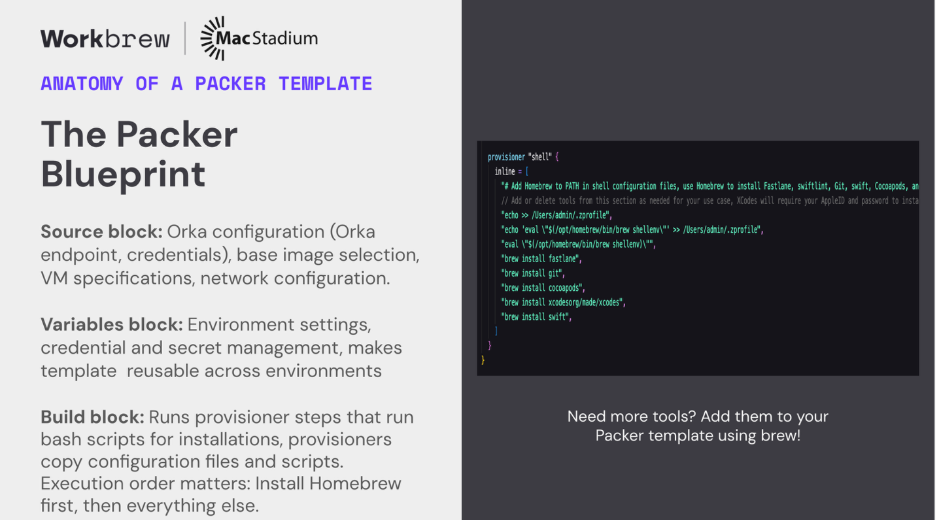
In a recent presentation at Cloud Native Rejekts 2025, I joined Workbrew Technical Account Manager Brandon Valentine to present ‘Brewed for Scale: How Homebrew Virtualized macOS DevOps with Kubernetes,’ which walked through the anatomy of a Packer template.
Source Blocks
The first piece is the source block, where Orka configuration takes place, a base image is selected, networking is configured and VM specifications are set. The next step in the process sets your environment variables, credentials, and handles secret management.

Provisioner Blocks
The final (and most crucial) step of the packer-build process consists of two provisioner blocks, the first of which installs Homebrew. Once Homebrew installation is complete, the second provisioner step kicks off. This is where developer tooling is installed, and you’ll be able to add or remove certain tools as you see fit.
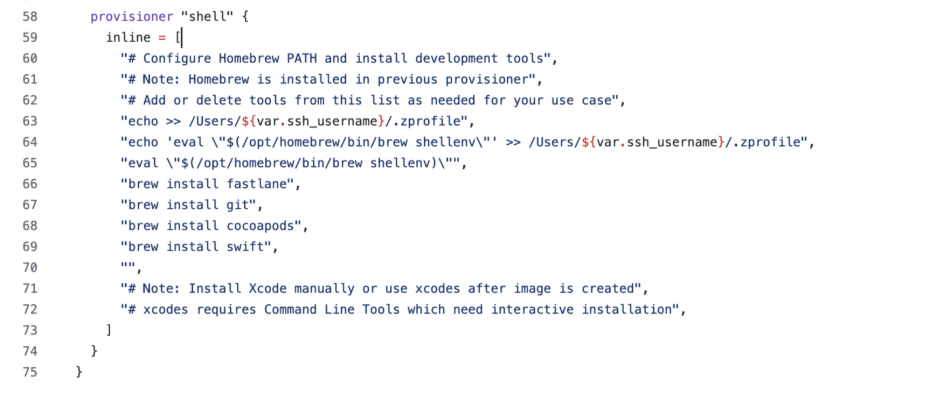
The default tooling included in both our Sequoia and Tahoe Packer templates covers most of the common iOS development workflows, but may not be exactly what you need. By using our open-source templates, you have the flexibility to customize things even further and make them truly your own. Need swiftlint for code quality? Add it. Using Carthage instead of CocoaPods? Swap them out. The choice is yours. You can customize tool selection, add new environment variables, run your own configuration scripts, and even create multiple template variants for different use cases. Each template builds on the same foundation, but includes role-specific tooling, making your team’s developer toolchain setup and CI/CD build environment maintenance simpler.
Results and Benefits
Environment provisioning
- Before: 4-6 hours to manually configure a new build agent
- After: 3-5 minutes to deploy from image
- Savings: 95%+ reduction in provisioning time
Debugging environment Issues
- Before: 30-60 minutes per incident investigating what's different between runners
- After: <5 minutes. Environments are identical, look elsewhere for the bug
- Savings: Typical team saves 10-15 hours per sprint on environment debugging
Developer onboarding
- Before: 1-2 days getting local environment matching CI
- After: 30 minutes, "Clone the repo, run this command, you're done"
- Savings: 80% reduction in onboarding friction
Audit and Compliance For regulated industries, infrastructure-as-code provides:
- Complete audit trail of what's running where
- Proof that security requirements are met
- Fast response to compliance questions: "Show me the template, that's what's running"
- Simplified SOC2/ISO27001 compliance for build infrastructure
Conclusion
The Orka Packer integration templates enable infrastructure automation and establish a secure foundation for sustainable growth. They run the version-controlled templates that define our build servers, embracing infrastructure as code for macOS, much like for Linux or Windows.
Setting up your Orka cluster to build images using Packer templates is a modest time investment, only requiring a few days to customize templates and migrate your first project. You can expect the returns to compound over time as every new project, every new team member onboarded, and every infrastructure expansion gets easier.
Eager to get started? Check out our Packer template examples on GitHub.